
Latest Fashion: Statement Sleeves Dress in Bold Color | instagram photography ai prompt
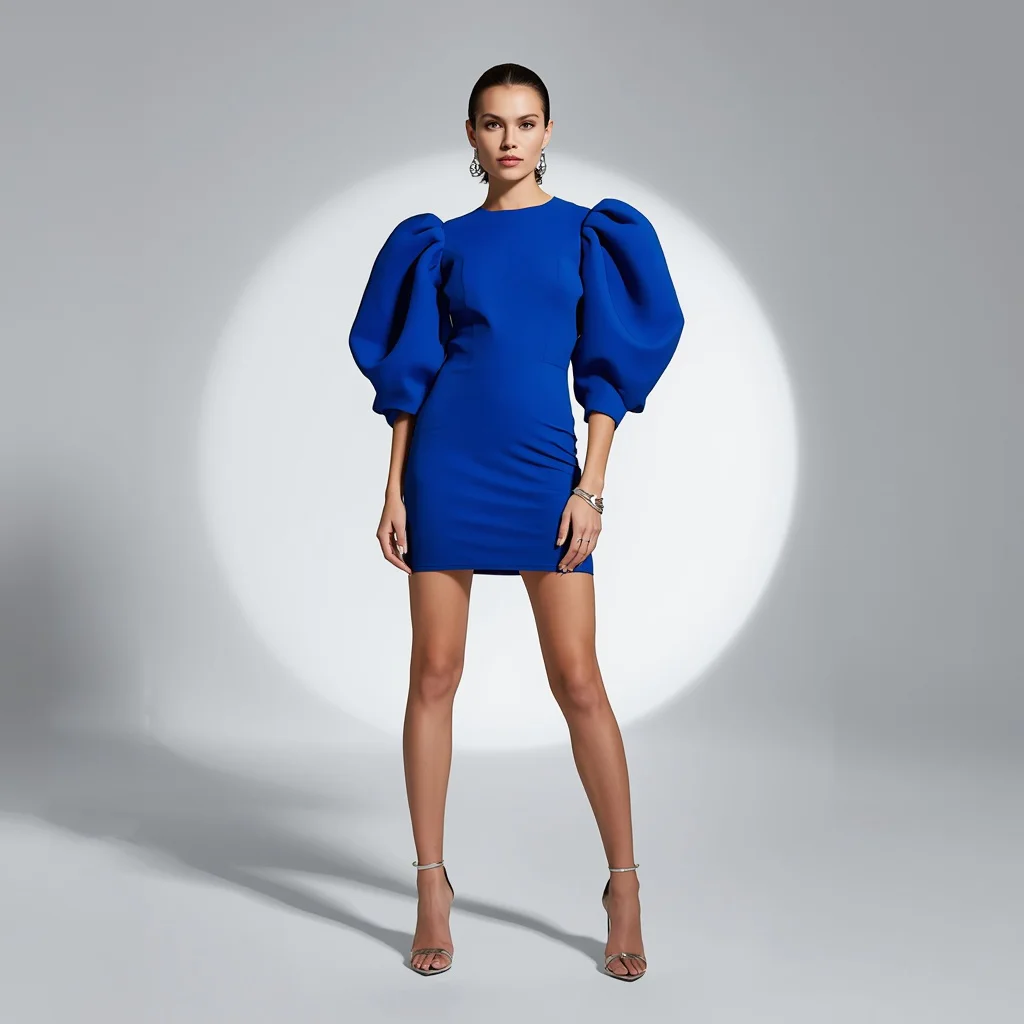
Fashion image generation is moving at lightning speed, and the latest prompt on Unlimited Prompt captures a trend that is dominating runways and Instagram feeds alike: the statement sleeve. This single image idea revolves around a sculptural cobalt blue mini dress with exaggerated puff sleeves, photographed in a stark studio setting. It is designed to produce an editorial-quality result that feels lifted straight from a luxury magazine.
The prompt focuses on clean lines, a bold silhouette, and precise lighting. Whether you are a fashion creator building a digital portfolio or a hobbyist testing AI’s ability to render avant-garde clothing, this prompt gives you a strong foundation. The following guide breaks down every element, from the real details inside the scene to the tools and techniques that will help you get a flawless generation.
What this cobalt statement-sleeves prompt is asking for
At its heart, this prompt describes a high-fashion studio portrait centered on a single dramatic garment. The AI is instructed to generate a model wearing a short, fitted dress in vibrant cobalt blue, with sleeves that are not just puffy but exaggerated and sculptural. The entire composition is built around the tension between the dress’s bold shape and the minimalist surroundings.
- A short, fitted dress in vibrant cobalt blue
- Dramatically exaggerated, sculptural puff sleeves
- Minimalist clear heels
- Delicate silver jewelry
- Slicked-back hair gathered into a sleek bun
- A clean studio background with a single dramatic spotlight
Inside the studio with the sculptural sleeve dress
The scene is stripped down to essentials so nothing competes with the garment. The prompt specifies "a clean, minimalist studio set" and "a single, dramatic spotlight," which means the background should be seamless, likely white, grey, or softly shadowed. The spotlight hits the model in a way that carves out the silhouette, creating deep contrast between the glowing cobalt fabric and the darker edges of the frame.
The model’s styling reinforces the futuristic elegance. Clauses like "minimalist clear heels" and "delicate silver jewelry" keep accessories almost invisible, while "hair is slicked back into a sleek bun" removes any distraction around the face and neck. The result is a photograph where the "dramatically exaggerated, sculptural puff sleeves" become the undisputed focal point, hovering like architectural forms around the model’s shoulders.
Why this prompt works for modern fashion imagery
This prompt succeeds because it combines a current runway trend with AI-friendly constraints. Statement sleeves read instantly as high fashion, while the controlled studio lighting and limited color palette reduce the chances of chaotic or muddled outputs. It is a concept that looks expensive and editorial without requiring a complex location or multiple models.
- The bold cobalt blue creates immediate visual impact and high contrast against a neutral studio background.
- Exaggerated sculptural sleeves give the AI a clear, dramatic shape to render, reducing ambiguity in the silhouette.
- Minimal accessories and a sleek bun keep the generation focused on the dress, lowering the risk of distorted details.
Three visual styles that suit this statement-sleeves image
The prompt naturally leans toward three distinct aesthetic treatments, all of which stay within its studio fashion boundaries. You can push it toward hyper-realistic editorial photography, a high-contrast chiaroscuro look, or a polished futuristic minimalism without altering the core clothing description.
- Hyper-realistic editorial: Emphasize skin texture, fabric weave, and subtle makeup details to mimic a luxury magazine cover shot.
- Dramatic chiaroscuro: Deepen the shadows and let the single spotlight carve the cobalt dress out of near-black surroundings for a painterly feel.
- Futuristic minimalism: Cool the white balance slightly and add a glossy finish to the clear heels and slicked hair for a sleek, space-age vibe.
How to generate the cobalt blue statement-sleeves photo
Creating this image is straightforward if you follow a structured workflow. Start by pasting the full prompt into your chosen AI tool, then refine the result with a reference image and targeted checks. The goal is a sharp, 8k fashion shot where the sleeves, face, and hands all look intentional and polished.
- Copy the full prompt. Select and copy the exact prompt text from Unlimited Prompt to preserve every detail about the dress, lighting, and styling.
- Upload a reference photo. Attach a studio fashion image with similar lighting and a plain background to guide the AI’s composition and mood.
- Generate the first batch. Run the prompt and produce four initial variations to see how the tool interprets the sculptural sleeves and spotlight.
- Check the hands. Zoom in on any visible hands to ensure fingers are natural, not fused or missing, and re-roll if needed.
- Check the face and hair. Examine the slicked-back bun and facial features for symmetry and realism, especially around the hairline.
- Verify the dress silhouette. Confirm that the cobalt blue dress remains short and fitted and that the puff sleeves look intentionally sculptural, not deflated.
Choosing the right reference photo for the shoot
A well-chosen reference image dramatically improves the AI’s understanding of lighting and pose. You do not need a picture of the exact cobalt dress; instead, look for a studio fashion portrait that shares the same clean, high-contrast atmosphere.
- Select a photo with a single strong light source from above or the side, creating defined shadows on the subject.
- Use an image where the model’s hair is pulled back or up, so the AI learns to render a sleek bun without stray strands.
- Pick a reference with a plain, seamless background to prevent the AI from introducing unwanted textures or props.
AI tools for generating this avant-garde fashion prompt
Different AI image generators handle fashion details and studio lighting with varying levels of realism. The table below compares four popular platforms, focusing on how each one can bring out the sculptural cobalt sleeves and dramatic spotlight.
| Tool | Access | Typical realism | Useful here for |
|---|---|---|---|
| ChatGPT | Plus or Enterprise subscription | High, with strong prompt adherence | Rendering the vibrant cobalt blue fabric and delicate silver jewelry with accurate color balance. |
| Google Gemini | Available in Google AI Studio | Moderate to high, improving rapidly | Capturing the single dramatic spotlight and clean minimalist studio set with strong contrast. |
| Leonardo AI | Freemium web platform | High, especially with cinematic models | Producing the exaggerated sculptural puff sleeves with sharp, defined edges and volume. |
| Midjourney | Discord-based subscription | Very high, often photorealistic | Delivering the overall high fashion, bold silhouette, and 8k sharp focus with editorial polish. |
Three tips to refine the statement-sleeves output
Small adjustments to your workflow can lift the image from good to gallery-worthy. These tips focus on the real materials and objects named in the prompt, helping you guide the AI toward a more cohesive result.
- Emphasize the clear heels in a negative prompt if they warp: add "distorted transparent shoes" to preserve their minimalist shape.
- Boost the silver jewelry’s visibility by adding "highly reflective delicate silver necklace and earrings" if the initial generations omit them.
- Describe the cobalt blue as "deep, saturated cobalt with a subtle sheen" in a style refinement step to prevent the dress from looking flat or matte.
Common issues and quick fixes for this prompt
Even a well-written fashion prompt can produce flawed results. The table below lists four frequent problems you might encounter with this statement-sleeves image and the specific changes that usually resolve them.
| Issue | What to change |
|---|---|
| Sleeves look deflated or lack volume | Add "extremely voluminous, stiff sculptural puff sleeves" and increase the weight of the sleeve description. |
| The spotlight creates harsh, blown-out highlights on the dress | Lower the contrast in your tool’s settings or add "soft dramatic spotlight, balanced exposure" to the prompt. |
| The sleek bun appears messy or has loose strands | Reinforce with "tight, perfectly slicked-back bun, no flyaways, gelled hair" in the styling portion of the prompt. |
| Clear heels look cloudy or misshapen | Add "crystal-clear PVC heels, perfectly transparent, sharp edges" and use a negative prompt for "frosted glass, blurry shoes." |
Frequently Asked Questions
Can I change the dress color from cobalt blue to something else without losing the editorial feel?
Yes, the bold silhouette works with any vibrant or even neutral shade. Replace "cobalt blue" with "scarlet red" or "emerald green" for a different mood, but keep the studio lighting and minimalist styling intact to maintain the high-fashion editorial look.
Why does the AI sometimes make the puff sleeves look like regular short sleeves?
This usually happens when the tool does not give enough weight to the sleeve description. Strengthen the prompt by adding adjectives like "oversized, architectural, stiffly sculpted puff sleeves" and consider using a reference photo that clearly features exaggerated sleeve volume.
Is it possible to generate this image with the model sitting instead of standing?
Absolutely. Add a pose description such as "seated on a minimalist clear acrylic cube" while keeping the spotlight, slicked-back bun, and cobalt dress details unchanged. The sculptural sleeves will still read strongly in a seated composition.
Conclusion
This cobalt blue statement-sleeves prompt is a compact, powerful tool for creating fashion-forward AI imagery. Its strength lies in the balance between a single bold garment and a restrained studio environment, which gives the generator clear direction without overwhelming it. By following the scene breakdown, style suggestions, and troubleshooting steps above, you can produce a sharp, 8k editorial photograph that looks like it belongs on a designer’s campaign page. Experiment with the lighting intensity and subtle accessory tweaks to make the image your own while keeping the sculptural silhouette at center stage.
Remember to only use a reference photo that you have the legal right to edit and incorporate into your creative workflow.


