

Top 10 Aesthetic Boy’s Photography AI Prompts for Captivating and Emotionally Rich Visual Narratives
Creating captivating boy photography with AI demands prompts that weave character, mood, and texture into a single frame. This collection of ten prompts spans rugged western themes, sleek urban looks, and high-fashion editorials, each designed to produce emotionally rich visual narratives. Whether you need a gritty outlaw or a modern screen breakout, these prompts give you the ingredients for images that feel authentic and cinematic.
Each prompt in this set focuses on a distinct male archetype, from the soulful musician strumming a banjo to the confident man in a silk bomber jacket. The shared thread is a commitment to storytelling through detail—weathered fabrics, directional lighting, and expressive poses. By working with these prompts, you can generate portraits that go beyond simple headshots and tap into deeper emotional resonance.
What this aesthetic boy photography collection is asking for
This collection calls for ten distinct male portraits, each rooted in a specific theme like western ruggedness, urban confidence, or high-fashion minimalism. Every prompt emphasizes full-body or editorial poses, detailed clothing textures, and cinematic lighting to create a strong emotional impact. The goal is to produce images that look like they belong in a magazine spread or a narrative film still.
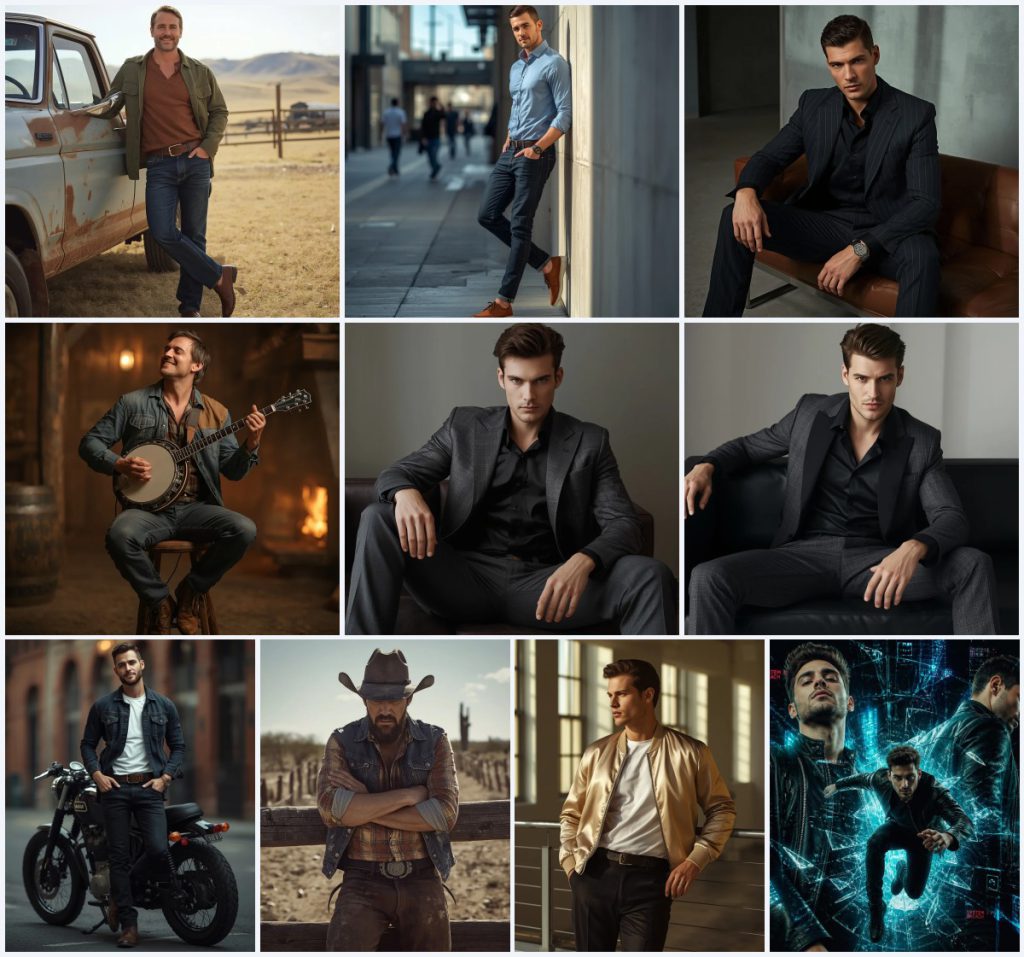
- A ruggedly handsome man leaning against a weathered pickup truck in a western-themed ranch setting.
- A confident man in a light blue button-down shirt and dark jeans against a sunlit urban wall.
- A premium menswear shot with an asymmetric charcoal grey suit jacket in a minimalist loft.
- A soulful musician playing a banjo in a fire-lit saloon, wearing a faded plaid shirt and patched denim jacket.
- A gritty outlaw in a distressed western outfit, leaning on a rustic fence with a wide-brimmed cowboy hat.
- A high-concept digital art piece of a man in a leather jacket breaking through a neon cyber screen.
The scenes these prompts build
The collection moves through varied environments, each tailored to the character's story. In the rancher prompt, the scene is "a vast, sun-drenched ranch with rolling fields and a distant barn," grounding the man in a timeless western landscape. The urban prompts shift to "a modern city street with blurred pedestrians and contemporary architecture" or "a gritty but stylish city backdrop with blurred brick buildings," adding a contemporary edge. For the high-fashion looks, the setting becomes "a modern minimalist loft" with "large loft windows" that stream in afternoon light.
The most dramatic scene appears in the screen breakout art, where "a handsome man wearing a modern, structured black leather jacket" shatters "a glowing neon cyber screen" surrounded by "glass shards, glowing blue wireframe lines, and glitch text." This contrast between earthy, rustic backdrops and sleek, futuristic spaces gives the collection its emotional range, from nostalgic warmth to edgy modernity.
Why these prompts work for captivating visual narratives
These prompts succeed because they prioritize storytelling over static posing, weaving clothing, lighting, and setting into a cohesive mood. The collection's variety ensures you can generate images that feel personal and dynamic, whether for social media, portfolio work, or creative projects. Each prompt locks in specific visual cues that AI models interpret as emotionally rich and photorealistic.
- Detailed clothing like "a durable canvas jacket" or "a luxury champagne-colored silk bomber jacket" gives the AI clear texture and style references, reducing generic outputs.
- Emotion-driven poses such as "eyes closed in concentration" or "a cool, collected expression with a hint of a smirk" guide the model toward nuanced facial expressions rather than blank stares.
- Cinematic lighting descriptions like "warm, flickering cinematic lighting" or "high-contrast cinematic lighting" create depth and drama, making the images feel professionally shot.
Three visual styles you can apply to these prompts
While the prompts already lean toward photorealism, you can push the aesthetic in three distinct directions without breaking their core identity. Staying within the prompt's framework, these styles enhance texture, mood, or artistic flair.
- Film grain editorial: Add a fine film grain overlay to the rancher or musician prompts to evoke a vintage magazine aesthetic, making the western themes feel like rediscovered archival shots.
- High-contrast noir: For the urban prompts, boost shadows and desaturate colors slightly to create a noir-inspired look that sharpens the man's confident stance against gritty brick backdrops.
- Cyberpunk hyperreal: In the screen breakout prompt, intensify neon glows and add lens flares to push the digital art into a hyperreal cyberpunk territory, amplifying the glitch text and wireframe details.
How to generate these aesthetic boy portraits step by step
Turning these prompts into striking images involves a straightforward workflow. Start with the full prompt text, then refine using a reference photo and careful post-generation checks. Each step ensures the final output matches the intended emotional and visual quality.
- Copy the full prompt. Select one prompt from the collection, such as the rancher or screen breakout, and copy the entire text exactly as written.
- Upload a reference photo. If your AI tool supports image input, upload a photo of a man with a similar build, beard style, or pose to guide proportions and lighting.
- Generate the initial image. Paste the prompt into your chosen AI tool and run it. Use a model known for photorealism, like Midjourney or Leonardo AI, for best results.
- Check the hands. Inspect the generated image for hand distortions. If fingers look unnatural, add a negative prompt like 'deformed hands' and regenerate.
- Check the face and expression. Ensure the man's face matches the described expression—warm and friendly, intense, or relaxed. Adjust the prompt if the gaze feels off.
- Check the main object. For prompts with props like a banjo or pickup truck, verify that the object is rendered cleanly without warping, and refine if needed.
Using a reference photo for these prompts
A well-chosen reference photo can dramatically improve the realism and consistency of your generated portraits. It gives the AI a concrete starting point for anatomy, lighting, and clothing fit, reducing the trial-and-error phase.
- Pick a photo where the man's pose loosely matches the prompt, such as leaning against a surface or sitting with an instrument, to anchor the body language.
- Ensure the reference has similar lighting to your target scene—soft window light for the loft prompts or harsh sunlight for the western settings—so shadows align naturally.
- Use a reference with facial features that match the prompt's descriptors, like a short beard or tousled hair, to avoid the AI defaulting to a generic face.
AI tools for generating aesthetic boy photography
Different AI platforms handle photorealism and detail differently. The table below compares four tools that work well with these prompts, highlighting their accessibility and strengths for this collection.
| Tool | Access | Typical realism | Useful here for |
|---|---|---|---|
| ChatGPT | Subscription-based | Good, with DALL-E integration | Rendering the silk bomber jacket's champagne sheen and soft afternoon light accurately. |
| Google Gemini | Free tier available | Moderate to high | Capturing the gritty outlaw's distressed denim and harsh sun on a windswept plain. |
| Leonardo AI | Freemium | High, with fine-tuning | Generating the screen breakout's glowing neon wireframe lines and glass shards with precision. |
| Midjourney | Paid subscription | Very high, cinematic | Producing the saloon's warm, flickering lighting and the musician's weathered banjo hands. |
Three tips for refining these boy photography prompts
Small tweaks to the prompt text can fix common AI quirks and elevate the final image. Focus on the materials and objects already named in the collection to keep the edits grounded.
- If the pickup truck in the rancher prompt looks too modern, add 'vintage 1970s Ford' to steer the model toward a more classic weathered vehicle.
- For the banjo prompt, append 'detailed wood grain on the banjo neck' to prevent the instrument from turning into a blurry, shapeless prop.
- When generating the leather jacket screen breakout, specify 'realistic leather texture with subtle reflections' to avoid a flat, plastic-like finish on the jacket.
Common issues and quick fixes for these prompts
Even well-crafted prompts can produce flawed images. The table below addresses four typical problems you might encounter with this collection and how to correct them.
| Issue | What to change |
|---|---|
| The man's expression looks blank instead of confident or warm | Add 'micro-expressions: slight smile lines around the eyes' to the prompt for more emotional depth. |
| The cowboy hat in the outlaw prompt merges with the background or looks misshapen | Insert 'distinct hat brim with a slight upward curl' to define its shape against the dusty plain. |
| The modern minimalist loft appears cluttered or unrecognizable | Replace with 'clean, open loft with exposed concrete walls and no furniture except the leather sofa' for clarity. |
| Glitch text in the cyber screen prompt is illegible or absent | Specify 'random alphanumeric glitch text in bright cyan and magenta' to force visible, colorful distortions. |
Frequently Asked Questions
Can I mix elements from different prompts in this collection?
Yes, you can blend details like taking the silk bomber jacket from one prompt and placing it in the urban street scene from another. Just ensure the lighting and pose descriptions remain consistent to avoid visual clashes.
Why do some prompts mention '85mm lens' and '4k'?
These terms guide the AI toward a shallow depth of field and high resolution, mimicking professional portrait photography. The 85mm lens creates a flattering compression, while 4k ensures sharp details in the final image.
How do I make the screen breakout art look less cartoonish?
Add keywords like 'photorealistic skin texture' and 'volumetric lighting' to the prompt. You can also reduce the intensity of neon colors slightly to keep the digital effect grounded in realism.
Conclusion
These ten aesthetic boy photography prompts offer a versatile toolkit for generating emotionally rich, visually captivating portraits. From the sun-drenched ranch to the neon cyber screen, each prompt is built to deliver narrative depth and photorealistic detail. By fine-tuning with reference photos, style tweaks, and careful post-generation checks, you can produce images that stand out in any portfolio or feed.
Remember to only use a reference photo that you own or have explicit permission to edit, ensuring your creative process stays ethical and legal.